Find the alphabet's order

Let ALP(String)

Let S(String)

Let SA1(String)

Let SA2(String)

Let SA3(String)

Let SB(String)

Let SC(String)

Let i(Integer)

Let n(integer)

Let d1(integer)

Let d2(integer)

Let d3(integer)


S=APP_DrawText\INPUT\inputString_ 

ALP="ABCDEFGHIJKLMNOPQRSTUVWXYZ"

SA1=S->Extract(1,1)

SA2=S->Extract(2,1)

SA3=S->Extract(3,1)


i=1

n=0


for i while i<26

{

SB=ALP->Extract(n,1) 

if SA1==SB

{

d1=n

}

else if  SA2==SB

{

d2=n

}

else if  SA3==SB

{

d3=n

}

n=n+1

}

Auto Join from ListSource

Let S(Surface)
Let A(Surface)
Let B(Surface)

Let i(Integer)

i=1

for i while i<=`Geometrical Set.3\Integer.2`
{
S=List_ALL ->GetItem(i)
A=assemble(B,S)
B=A
}

`Geometrical Set.3\Surface.46` =B

Sorting List

Let tmplist(List)
Let newlist(List)

tmplist.Append(tmpLine\Line.1  )
tmplist.Append(tmpLine\Line.2  )
tmplist.Append(tmpLine\Line.3  )
tmplist.Append(tmpLine\Line.4  )

newlist=tmplist.Sort(">","Line","length","y=length(x)")

Sorting\Line_Getitem_1 =newlist->GetItem(1)
Sorting\Line_GetItem_2 =newlist->GetItem(2)


Retrieving Point Coordinate and Converting to Single String

Let P1(Point)
Let XL(Length)
Let YL(Length)
Let ZL(Length)

Let XR(Real)
Let YR(Real)
Let ZR(Real)

Let XS(String)
Let YS(String)
Let ZS(String)

Let XYZ(String)


P1=`Geometrical Set.2\SelPT`


XL =P1->coord(1)
YL =P1->coord(2)
ZL =P1->coord(3)
' --- ※Point >coord (rank: Integer): Length
' --- ※Returns the coordinates of a point. Returns X if 1 is specified, Y if 2 is specified, Z if 3 is specified.

XR=int(XL/1mm)
YR=int(YL/1mm)
ZR=int(ZL/1mm)

XS=ToString(XR)
YS=ToString(YR)
ZS=ToString(ZR)

XYZ=XS+", "+YS+", "+ZS
`Geometrical Set.2\ResultString` =XYZ

Knowledge Pattern : Sample (Suwon 2nd Gym Project)

Let udf(UserFeature)
Let i(Integer)
Let li(Line)
Let st(String)

i=1

For i while i <= `List_SpaceFrameLine\Size`
{

li=`List_SpaceFrameLine` ->GetItem(i)
st="SpPipe_"+ToString(i)

udf= CreateOrModifyTemplate("Knowledge_Pattern_Catalog|SpaceFrame_PipeGeo",`SpaceFrame_Pipe`   ,`Relations\Knowledge Pattern_SpacePipe\UDFs`  ,i)
udf->SetAttributeObject("CenterLine", li  )
udf.Name=st
udf.Color=`Pipe_Color`
EndModifyTemplate(udf)

i=i+1
}


Using the Object Browser

 The object browser guides you when writing a script. It allows you to access the keywords, operators and  feature attributes that can be used when working with Product Knowledge Template.


Rule's Rule

1. if나 else의 구문은 Rule에서 단 한번 사용이 가능하다.

2. else if의 사용은 무제한적으로 반복할수 있다.

Rule: Visualizable Type

Color Attribute

Allows you to get and set the color of a Generative Shape Design feature. The Color attribute is defined as a character string. When comparing values,  bear in mind that the color attribute must be written in lowercase and not in uppercase. The color can be specified either by its full name or by its hexadecimal value:


Show Attribute

Allows you to get/set the Show/NoShow mode of a Generative Shape Design feature. The Show/NoShow mode is to be set by a boolean (true/false).


Pick Attribute

Allows you to set the "Pickable" status of  a feature so that it can or cannot not be selected in the geometrical area. The Pick attribute is to be set by a boolean.


Layer attribute

Allows you to get/set the layer associated with a feature.


Examples

Expert Rule1
(for all) G:GSMCurve
 if G.Show == False
 then G.Show = True

Expert Rule2
(for all) P:GSMPoint
 P.Color = "blue"
 P.Show = False
 Message ("Curve pick is set to #", G.Pick)
 P.Layer = 1
 Message ("Point layer is set to #", P.Layer)

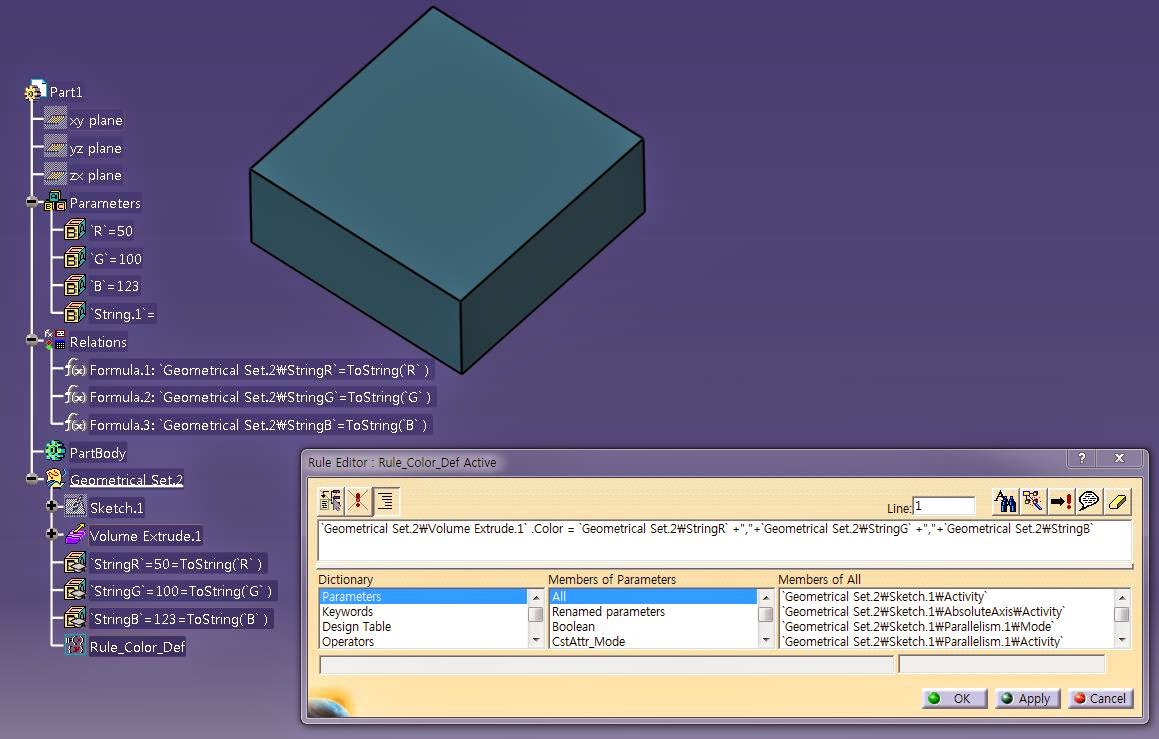
Change Object's Color in a Rule


OR


Knowledge Pattern의 기초(02)

Knowledge Pattern의 기초(01)


CreateOrModifyDatum


 This method is only used in the Knowledge Pattern Feature.

Enables you to create or modify a datum.
-datumType: Indicates the datum type: Point, Line, Curve, Circle, Surface, Plane, Volume..
-Destination: Indicates the destination feature (PartBody, ...).
-PatternList: Indicates the pattern list.(The Knowledge Pattern List that should track the geometry)
-IndexInPatternList: Indicates the index number in the pattern list.

Rule Example(03) : Create a Loop in a Rule

Case1.


Let x(Point)

for x inside `ListTest`

{
if (x.GetAttributeReal("X") < 0.02)
x.SetAttributeReal("Z",0.10)
else
x.SetAttributeReal("Z",0.01)
}


case 2.


Let x(Point)

let i = 1
let x(Point)

for i while i<=`ListTest` .Size()
{
x = `ListTest` .GetItem(i)
if (x.GetAttributeReal("X") < 0.01)
x.SetAttributeReal("Z",0.1)
else
x.SetAttributeReal("Z",0.2)
}


Collect Points(alternative) : Create formula that will automatically fill in the list

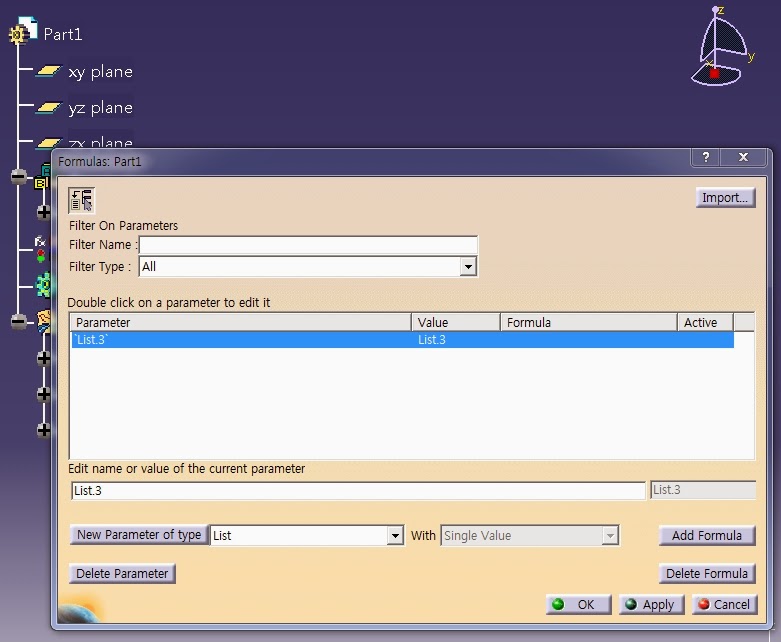
1.Click the Formula icon to Create List


2. Click the Add Formula. The Formula Editor is displayed.

3. OpenBodyFeature.Query("Point",""). Click OK twice when done.


4. You can find "List.3=OpenBodyFeature.Query("Point","")"


5. Click "OK" when done. The formula is added to the Relations tree

Rule Example(02): Collect Points(in OpenBodyFeature) to List

Let tmpList(List)
Let tmpList2(List)
Let tmpPoint(Point)
Let I (Integer)

Set I=1

tmpList = `PointTest` .Query("Point","")

For I While I<= tmpList.Size()
{
tmpPoint = tmpList.GetItem(I)

If tmpPoint.IsRoot == true
{
tmpList2.Append(tmpPoint)
}
}
`List_PTG` = Copy(tmpList2)


Let tmpList(List)

Let tmpList11A(List)
Let tmpList11B(List)
Let tmpList12(List)
Let tmpList21(List)
Let tmpList22(List)

Let tmpCrv(Curve)
Let I (Integer)

Set I=1

tmpList = `Series\Type-TB` .Query("Curve","")
※ 외부리스트로 처리하지말고 내부적으로 처리할것(속도차이에 매우 유리함)

For I While I<= tmpList.Size()
{
tmpCrv = tmpList.GetItem(I)

If tmpCrv.Name == "11A_UPPER_Flange_BaseLine-A"
{
tmpList11A.Append(tmpCrv)
}

else if tmpCrv.Name == "11B_UPPER_Flange_BaseLine-B(LvDown)"
{
tmpList11B.Append(tmpCrv)
}

else if tmpCrv.Name == "12_UPPER_Web-EndLine"
{
tmpList12.Append(tmpCrv)
}

else if tmpCrv.Name == "21_UNDER_Flange_BaseLine"
{
tmpList21.Append(tmpCrv)
}

else if tmpCrv.Name == "22_UNDER_Web-EndLine"
{
tmpList22.Append(tmpCrv)
}
}

`11A_UPPER_Flange_BaseLine-A`  = Copy(tmpList11A)
`11B_UPPER_Flange_BaseLine-B(LvDown)` = Copy(tmpList11B)
`12_UPPER_Web_EndLine` =Copy(tmpList12)
`21_UNDER_Flange_BaseLine` =Copy(tmpList21)
`22_UNDER_Web-EndLine` =Copy(tmpList22)

Rule Example(01) :Change Object Name

0. 해당구문의 형식은 아래와 같음

Let newname(String)
newname='Input String'
'Input Object'.Name=newname


1. rule구문입력(구문에 따라 대소문자에 주의할 부분이 있을수 있음)


2. 지정된 객체의 이름이 변경된 것을 확인할수 있음