Let S(Surface)
Let A(Surface)
Let B(Surface)
Let i(Integer)
i=1
for i while i<=`Geometrical Set.3\Integer.2`
{
S=List_ALL ->GetItem(i)
A=assemble(B,S)
B=A
}
`Geometrical Set.3\Surface.46` =B

Sorting List
Let tmplist(List)
Let newlist(List)
tmplist.Append(tmpLine\Line.1 )
tmplist.Append(tmpLine\Line.2 )
tmplist.Append(tmpLine\Line.3 )
tmplist.Append(tmpLine\Line.4 )
newlist=tmplist.Sort(">","Line","length","y=length(x)")
Sorting\Line_Getitem_1 =newlist->GetItem(1)
Sorting\Line_GetItem_2 =newlist->GetItem(2)

Let newlist(List)
tmplist.Append(tmpLine\Line.1 )
tmplist.Append(tmpLine\Line.2 )
tmplist.Append(tmpLine\Line.3 )
tmplist.Append(tmpLine\Line.4 )
newlist=tmplist.Sort(">","Line","length","y=length(x)")
Sorting\Line_Getitem_1 =newlist->GetItem(1)
Sorting\Line_GetItem_2 =newlist->GetItem(2)

Rule: Visualizable Type
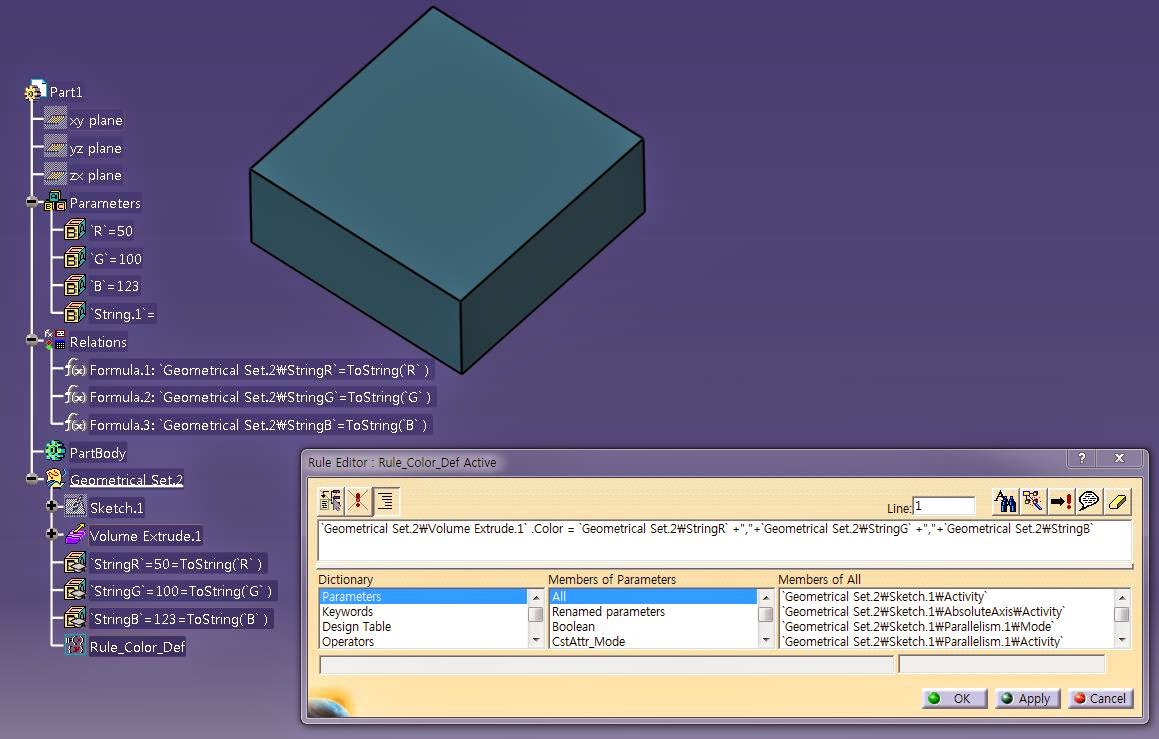
Color Attribute
Allows you to get and set the color of a Generative Shape Design feature. The Color attribute is defined as a character string. When comparing values, bear in mind that the color attribute must be written in lowercase and not in uppercase. The color can be specified either by its full name or by its hexadecimal value:
Show Attribute
Allows you to get/set the Show/NoShow mode of a Generative Shape Design feature. The Show/NoShow mode is to be set by a boolean (true/false).
Pick Attribute
Allows you to set the "Pickable" status of a feature so that it can or cannot not be selected in the geometrical area. The Pick attribute is to be set by a boolean.
Layer attribute
Allows you to get/set the layer associated with a feature.
Examples
Expert Rule1
(for all) G:GSMCurve
if G.Show == False
then G.Show = True
Expert Rule2
(for all) P:GSMPoint
P.Color = "blue"
P.Show = False
Message ("Curve pick is set to #", G.Pick)
P.Layer = 1
Message ("Point layer is set to #", P.Layer)
Allows you to get and set the color of a Generative Shape Design feature. The Color attribute is defined as a character string. When comparing values, bear in mind that the color attribute must be written in lowercase and not in uppercase. The color can be specified either by its full name or by its hexadecimal value:
Show Attribute
Allows you to get/set the Show/NoShow mode of a Generative Shape Design feature. The Show/NoShow mode is to be set by a boolean (true/false).
Pick Attribute
Allows you to set the "Pickable" status of a feature so that it can or cannot not be selected in the geometrical area. The Pick attribute is to be set by a boolean.
Layer attribute
Allows you to get/set the layer associated with a feature.
Examples
Expert Rule1
(for all) G:GSMCurve
if G.Show == False
then G.Show = True
Expert Rule2
(for all) P:GSMPoint
P.Color = "blue"
P.Show = False
Message ("Curve pick is set to #", G.Pick)
P.Layer = 1
Message ("Point layer is set to #", P.Layer)

Rule Example(03) : Create a Loop in a Rule
Case1.
Let x(Point)
for x inside `ListTest`
{
if (x.GetAttributeReal("X") < 0.02)
x.SetAttributeReal("Z",0.10)
else
x.SetAttributeReal("Z",0.01)
}

case 2.
let i = 1
let x(Point)
for i while i<=`ListTest` .Size()
{
x = `ListTest` .GetItem(i)
if (x.GetAttributeReal("X") < 0.01)
x.SetAttributeReal("Z",0.1)
else
x.SetAttributeReal("Z",0.2)
}

Rule Example(02): Collect Points(in OpenBodyFeature) to List
Let tmpList(List)
Let tmpList2(List)
Let tmpPoint(Point)
Let I (Integer)
Set I=1
tmpList = `PointTest` .Query("Point","")
For I While I<= tmpList.Size()
{
tmpPoint = tmpList.GetItem(I)
If tmpPoint.IsRoot == true
{
tmpList2.Append(tmpPoint)
}
}
`List_PTG` = Copy(tmpList2)

Let tmpList(List)
Let tmpList11A(List)
Let tmpList11B(List)
Let tmpList12(List)
Let tmpList21(List)
Let tmpList22(List)
Let tmpCrv(Curve)
Let I (Integer)
Set I=1
tmpList = `Series\Type-TB` .Query("Curve","")
※ 외부리스트로 처리하지말고 내부적으로 처리할것(속도차이에 매우 유리함)
For I While I<= tmpList.Size()
{
tmpCrv = tmpList.GetItem(I)
If tmpCrv.Name == "11A_UPPER_Flange_BaseLine-A"
{
tmpList11A.Append(tmpCrv)
}
else if tmpCrv.Name == "11B_UPPER_Flange_BaseLine-B(LvDown)"
{
tmpList11B.Append(tmpCrv)
}
else if tmpCrv.Name == "12_UPPER_Web-EndLine"
{
tmpList12.Append(tmpCrv)
}
else if tmpCrv.Name == "21_UNDER_Flange_BaseLine"
{
tmpList21.Append(tmpCrv)
}
else if tmpCrv.Name == "22_UNDER_Web-EndLine"
{
tmpList22.Append(tmpCrv)
}
}
`11A_UPPER_Flange_BaseLine-A` = Copy(tmpList11A)
`11B_UPPER_Flange_BaseLine-B(LvDown)` = Copy(tmpList11B)
`12_UPPER_Web_EndLine` =Copy(tmpList12)
`21_UNDER_Flange_BaseLine` =Copy(tmpList21)
`22_UNDER_Web-EndLine` =Copy(tmpList22)
Let tmpList2(List)
Let tmpPoint(Point)
Let I (Integer)
Set I=1
tmpList = `PointTest` .Query("Point","")
For I While I<= tmpList.Size()
{
tmpPoint = tmpList.GetItem(I)
If tmpPoint.IsRoot == true
{
tmpList2.Append(tmpPoint)
}
}
`List_PTG` = Copy(tmpList2)
Let tmpList(List)
Let tmpList11A(List)
Let tmpList11B(List)
Let tmpList12(List)
Let tmpList21(List)
Let tmpList22(List)
Let tmpCrv(Curve)
Let I (Integer)
Set I=1
tmpList = `Series\Type-TB` .Query("Curve","")
※ 외부리스트로 처리하지말고 내부적으로 처리할것(속도차이에 매우 유리함)
For I While I<= tmpList.Size()
{
tmpCrv = tmpList.GetItem(I)
If tmpCrv.Name == "11A_UPPER_Flange_BaseLine-A"
{
tmpList11A.Append(tmpCrv)
}
else if tmpCrv.Name == "11B_UPPER_Flange_BaseLine-B(LvDown)"
{
tmpList11B.Append(tmpCrv)
}
else if tmpCrv.Name == "12_UPPER_Web-EndLine"
{
tmpList12.Append(tmpCrv)
}
else if tmpCrv.Name == "21_UNDER_Flange_BaseLine"
{
tmpList21.Append(tmpCrv)
}
else if tmpCrv.Name == "22_UNDER_Web-EndLine"
{
tmpList22.Append(tmpCrv)
}
}
`11A_UPPER_Flange_BaseLine-A` = Copy(tmpList11A)
`11B_UPPER_Flange_BaseLine-B(LvDown)` = Copy(tmpList11B)
`12_UPPER_Web_EndLine` =Copy(tmpList12)
`21_UNDER_Flange_BaseLine` =Copy(tmpList21)
`22_UNDER_Web-EndLine` =Copy(tmpList22)
Rule Example(01) :Change Object Name
0. 해당구문의 형식은 아래와 같음
Let newname(String)
newname='Input String'
'Input Object'.Name=newname
Let newname(String)
newname='Input String'
'Input Object'.Name=newname


피드 구독하기:
글 (Atom)