레이블이 Knowledge인 게시물을 표시합니다. 모든 게시물 표시

Rule Example(03) : Create a Loop in a Rule

Case1.


Let x(Point)

for x inside `ListTest`

{
if (x.GetAttributeReal("X") < 0.02)
x.SetAttributeReal("Z",0.10)
else
x.SetAttributeReal("Z",0.01)
}


case 2.


Let x(Point)

let i = 1
let x(Point)

for i while i<=`ListTest` .Size()
{
x = `ListTest` .GetItem(i)
if (x.GetAttributeReal("X") < 0.01)
x.SetAttributeReal("Z",0.1)
else
x.SetAttributeReal("Z",0.2)
}


Collect Points(alternative) : Create formula that will automatically fill in the list

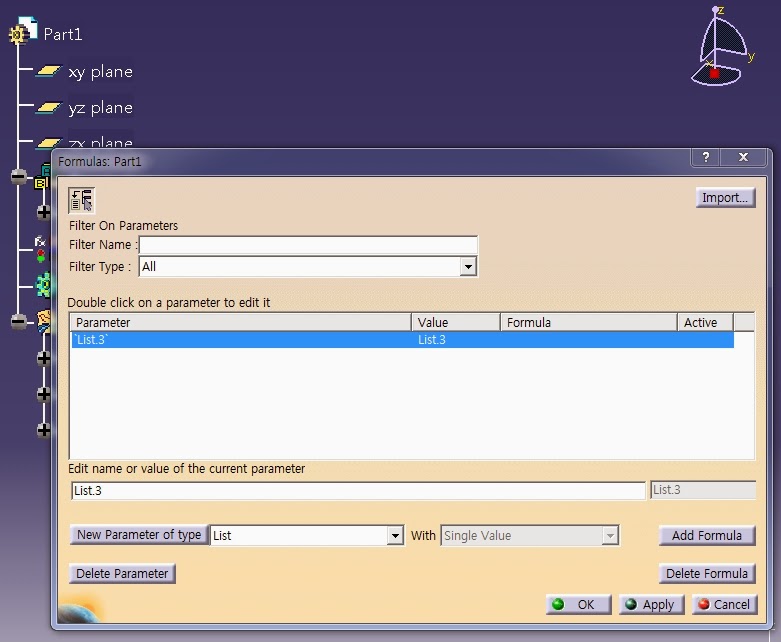
1.Click the Formula icon to Create List


2. Click the Add Formula. The Formula Editor is displayed.

3. OpenBodyFeature.Query("Point",""). Click OK twice when done.


4. You can find "List.3=OpenBodyFeature.Query("Point","")"


5. Click "OK" when done. The formula is added to the Relations tree

Rule Example(02): Collect Points(in OpenBodyFeature) to List

Let tmpList(List)
Let tmpList2(List)
Let tmpPoint(Point)
Let I (Integer)

Set I=1

tmpList = `PointTest` .Query("Point","")

For I While I<= tmpList.Size()
{
tmpPoint = tmpList.GetItem(I)

If tmpPoint.IsRoot == true
{
tmpList2.Append(tmpPoint)
}
}
`List_PTG` = Copy(tmpList2)


Let tmpList(List)

Let tmpList11A(List)
Let tmpList11B(List)
Let tmpList12(List)
Let tmpList21(List)
Let tmpList22(List)

Let tmpCrv(Curve)
Let I (Integer)

Set I=1

tmpList = `Series\Type-TB` .Query("Curve","")
※ 외부리스트로 처리하지말고 내부적으로 처리할것(속도차이에 매우 유리함)

For I While I<= tmpList.Size()
{
tmpCrv = tmpList.GetItem(I)

If tmpCrv.Name == "11A_UPPER_Flange_BaseLine-A"
{
tmpList11A.Append(tmpCrv)
}

else if tmpCrv.Name == "11B_UPPER_Flange_BaseLine-B(LvDown)"
{
tmpList11B.Append(tmpCrv)
}

else if tmpCrv.Name == "12_UPPER_Web-EndLine"
{
tmpList12.Append(tmpCrv)
}

else if tmpCrv.Name == "21_UNDER_Flange_BaseLine"
{
tmpList21.Append(tmpCrv)
}

else if tmpCrv.Name == "22_UNDER_Web-EndLine"
{
tmpList22.Append(tmpCrv)
}
}

`11A_UPPER_Flange_BaseLine-A`  = Copy(tmpList11A)
`11B_UPPER_Flange_BaseLine-B(LvDown)` = Copy(tmpList11B)
`12_UPPER_Web_EndLine` =Copy(tmpList12)
`21_UNDER_Flange_BaseLine` =Copy(tmpList21)
`22_UNDER_Web-EndLine` =Copy(tmpList22)

Rule Example(01) :Change Object Name

0. 해당구문의 형식은 아래와 같음

Let newname(String)
newname='Input String'
'Input Object'.Name=newname


1. rule구문입력(구문에 따라 대소문자에 주의할 부분이 있을수 있음)


2. 지정된 객체의 이름이 변경된 것을 확인할수 있음